TOP 5 Heat Sinks TOP 5 Low Profile Heat Sinks TOP 5 Liquid Coolers
Heatsinks by Brand / Mfgr Reviews + Articless Advanced Search
|
TOP 5 Heat Sinks TOP 5 Low Profile Heat Sinks TOP 5 Liquid Coolers Heatsinks by Brand / Mfgr Reviews + Articless Advanced Search |
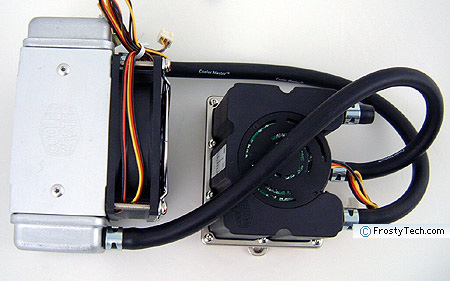
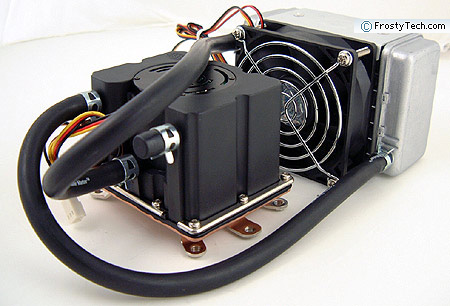
The Coolermaster Aquagate Mini R80 is a self contained watercooling system designed for a broad range of Intel and AMD processors. Unlike a lot of CPU watercooling systems which can be complicated to install, fill, bleed and monitor, the Aquagate comes pre-plumbed and pre-filled with an ethylene glycol based coolant. The system is guaranteed for two years operation without need for refill, so to get started all you need to do is mount the CPU block and attach the heat exchanger to the side of the computer case. To Coolermaster's credit, the Aquagate Mini R80 is little more complicated than a heavy copper heatsink to install. What makes the Aquagate Mini R80 so simple is a novel integrated pump/waterblock. Traditional watercooling set ups usually involve separate waterblocks, pumps and reservoirs. The Aquagate Mini R80 does have a separate aluminum heat exchanger (radiator) with 80mm speed controlled fan, but otherwise it's an all-in-one approach. The heat exchanger is designed to mount at the rear of a PC chassis where a standard 80mm case exhaust fan would normally sit. There is no need to cut holes in the back of your PC case, or route tubes through to the outside however. Since the coolant is pre-filled in the Coolermaster Aquagate Mini R80 system there's no messing around with mixtures of anti-freeze and distilled water, no filling and air bleeding of the waterblock to be done, and no worry about contaminants entering the system. All tubing joints are sealed with professional grade spring clamps, so hopefully leakage won't be a concern either. The tubing used to connect the heat exchanger and water block together is an opaque grade of heat resistant EPT710 rubber, selected according to the manufacturer to cut down on coolant evaporation. The Aquagate Mini R80 is a low flow watercooling system so the tubing is pretty narrow - just 6.5mm ID (10mm OD). The tubing is fairly kink resistant too.
Built into
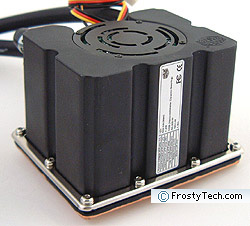
the waterblock is a 12V fluid pump. The pump's impeller operates at 2300RPM on ceramic bearings to
move 45Litres per hour with a head of up to 1.5meters. Pump failure
is a always a concern with watercooling gear, so while it's
reassuring that the reservoir is integrated into the waterblock, it's hard to look past the fact Coolermaster
provide no flow alarm or fluid level sensor to speak
of. If this system dries out three years down the road, there is nothing to alert the
user other than a PC which while begin randomly crashing.
Coolermaster's Aquagate Mini
R80 is compatible with Intel socket 775, 478, Xeon 603/604, and
AMD K7 socket A, and K8 socket 754/939/940/AM2 processors. From a
CPU compatibility stand point this is a really versatile platform.
I suppose Coolermaster are expecting users to
install it into overclocked rigs or even Xeon based workstations. Watercooling is often portrayed as an alternative to
air cooling because the system can be operated quietly, and heat exhausted from
the chassis in a central location. Before you dive into the Aquagate Mini R80
thinking its a silent way to cool your home recording studio PC however, scroll down
and take a look at the acoustic results. The unit Frostytech is testing in this review is
the 80mm Aquagate Mini R80 RL-MUA-E8U1 model, and it retails for about $99USD ($99CDN). Coolermaster have an
second revision available with 120mm fan and a slightly larger heat
exchanger. Setup and Installation Setting up Coolermaster's Aquagate Mini R80 watercooling
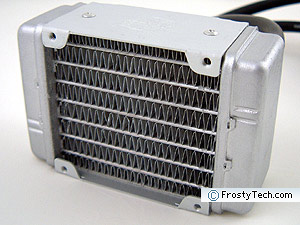
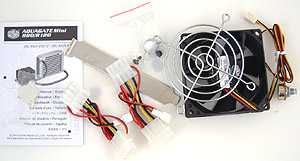
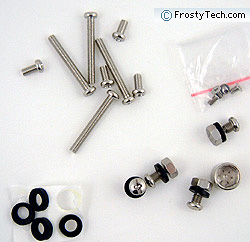
system is quick and easy. The only real pre-requisite is a space at the rear of your PC case large enough for the 79mm tall by 120mm wide aluminum heat exchanger to mount. It doesn't weigh much (172gram, and works with any standard 80mm fan mounting hole pattern. Long machine screws are included to attach it to the side of the case, either with the fan sandwiched between or exhausting out from the opposite side. The length of tubing from the heat exchanger to the waterblock measures approximately 26cm long. We found this sufficient to allow unhindered installation of the CPU block on most ATX or microATX motherboards.
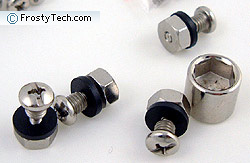
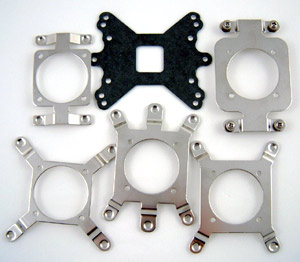
The Aquagate Mini R80 comes with a pile of mounting brackets for the different processor platforms it's compatible with. After selecting the correct plate and attaching it to the copper base of the 570gram pump/water block unit, the system can be installed on the processor. This step is a little more involved than we like, because you'll need to pull the motherboard from the chassis so a back plate (or screws) can be fed through from the rear to lock into the waterblock retention plate in place. If you ever want to swap out the processor, uninstalling everything is a royal pain...
  The
aluminum heat exchanger in this kit comes with an 80mm fan that has a PCI
bracket manual fan speed controller. The fan rotates at 3800RPM, so it's loud. You'll have to play
with the speed to find a
happy medium. On the unit
Frostytech tested, the wire broke right at the solder joint on
the potentiometer, so we had to repair that before testing... It
goes without saying that if the fan fails, the system is incapable of shedding
the heat the waterblock absorbs from the CPU, and will very quick cause your PC to
overheat.
FrostyTech's Test Methodologies
are outlined in detail
here
if you care to know what equipment is
used, and the parameters under which the tests are conducted. Now let's move
forward and take a closer look at this heatsink, its acoustic characteristics,
and of course its performance in the thermal tests!
|
 |
|
| |||||||||||||||||||||||||||||||||||||||||
|
Find a Heatsink . Latest Heatsink Reviews . Top 5 Heatsinks Tested . Top 5 Low Profile Heatsinks . Top 5 Liquid Coolers . Heatsinks by Mfgr / Brand |
Social Media |
FrostyTech.com Info . Feedback . Contact Us / Heatsink Submissions . Submit News . Privacy Policy |
 | |
© Copyright 1999-2025 www.frostytech.com All Rights Reserved. Privacy policy and Terms of Use Images © FrostyTech.com and may not be reproduced without express written permission. Current students and faculty of accredited Universities may use Frostytech images in research papers and thesis, provided each image is attributed. | ||||


 The coolant is Ethylene Glycol based and blue in colour, rated to remain liquid from -30°C to 197.6°C, with an
operating thermal resistance of 0.255(°C/W).
The coolant is Ethylene Glycol based and blue in colour, rated to remain liquid from -30°C to 197.6°C, with an
operating thermal resistance of 0.255(°C/W).