TOP 5 Heat Sinks TOP 5 Low Profile Heat Sinks TOP 5 Liquid Coolers
Heatsinks by Brand / Mfgr Reviews + Articless Advanced Search
|
TOP 5 Heat Sinks TOP 5 Low Profile Heat Sinks TOP 5 Liquid Coolers Heatsinks by Brand / Mfgr Reviews + Articless Advanced Search |
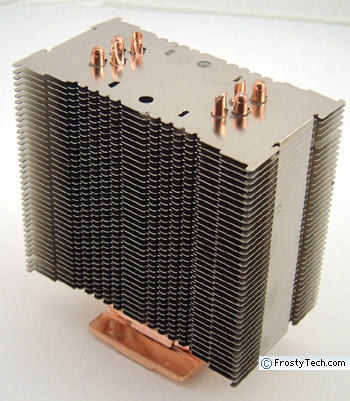
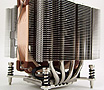
The Noctua NH-U12 heatsink arose from a collaboration between the Vienna, Austria based Rascom Computerdistribution Ges.m.b.H and Taiwanese manufacturer Kolink International Corp. Under the banner name of Noctua, the companies have released a set of heatsinks optimized for use with large fans which can operate very quietly, without restricting the underlying thermal performance of the heatsink... and as you'll soon see the Noctua NH-U12 is quite impressive in that regard. Such is the background story behind the Noctua NH-U12, a large 155mm tall heatsink that resembles a Soviet-era apartment block. The Noctua NH-U12 heatsink comes with all the necessary mounting hardware, but no fans are included. Mounting clips will allow users to install a 120mm fan on either side of the unit if they desire, but we found a single 120mm fan more than sufficient for the job. The 38 nickel-plated aluminum cooling fins are connected by four copper heat pipes to a copper base plate that pushes the overall weight to around 700grams. The Noctua NH-U12 is a little heavy and a bit bulky for smaller cases, so we'd suggest measuring first to ensure clearance. All joints between the copper heat pipes and base are soldered for the lowest possible thermal resistance, however RoHS compliance is not stated (per 2002/95/EU) so this heatsink may not be available in Europe for much longer.
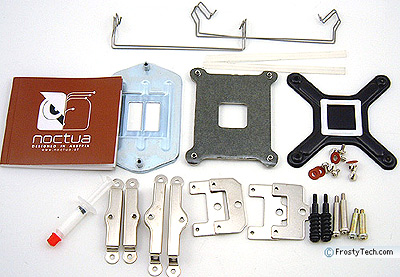
The Noctua NH-U12 comes with a variety of brackets for installing
the heatsink onto different processor sockets, but the gist is that a set of plates are screwed into the copper
base, the backplate positioned behind the motherboard, then everything is screwed down onto
the CPU. The fan is the last component to be attached, and because Noctua sell the NH-U12 without one, you'll need to source out a 120mm fan of your own choice first. If you try and install the heatsink with the fan in place you'll quickly discover that it blocks the screws for the heatsink mounting hardware... which makes the whole process a little annoying if the computer case is tight. The Noctua NH-U12 is being tested on an AMD Athlon64 K8 compatible synthetic temperature test platform in this review. We picked out the necessary brackets with the aide of the multi-language manual, and set about the installation task in the course of a few minutes. Getting the large Noctua NH-U12 into position on the CPU die and affixed with the spring-tensioned screws wasn't too difficult. It was just a matter of attaching the clear rubber anti-vibration strips to the back vertical edges of a 120mm fan and locking that into place with the included wire clips. The important bit is to stick on the anti-vibration strips to the rear of the fan first, or you'll quickly find yourself repeating steps. Leaving the strips out is not advisable unless you like the sound of rattling metal bits. The fan is oriented such that air blows through the fins of the Noctua NH-U12 heatsink, so hot air should be blowing towards the rear or top of an actual PC case. Retroactive Socket 1366 Intel Core i7 Processor CompatibilityOne of the nice aspects of this heatsink is that Noctua has released a new mounting kit to make it compatible with Intel's Core i7 socket 1366 processor! The Noctua SecuFirm2 mounting kit works with any Noctua CPU heatsink going back to 2005, and best of all it's available for free from Noctua's website. Socket 1366 processors use slightly wider spaced motherboard mounting holes for heatsinks to attach to - 80mm vs. 72mm for LGA775 chips - so existing socket 775 brackets are not compatible with this new Intel CPU in spite of the fact the heatsink is probably still well suited. 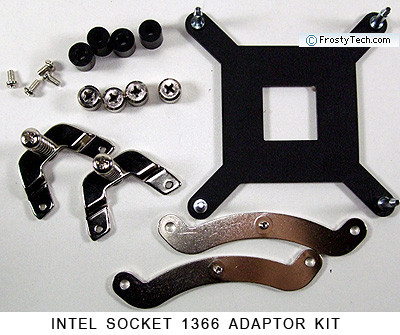 FrostyTech's K8 Test Methodology is outlined in detail here if you care to know what equipment is used, and the parameters under which the tests are conducted. Now let's move forward and take a closer look at this heatsink, its acoustic characteristics, and of course it performance in the thermal tests!
|
 |
|
| |||||||||||||||||||||||||||||||||||||||||||||
|
Find a Heatsink . Latest Heatsink Reviews . Top 5 Heatsinks Tested . Top 5 Low Profile Heatsinks . Top 5 Liquid Coolers . Heatsinks by Mfgr / Brand |
Social Media |
FrostyTech.com Info . Feedback . Contact Us / Heatsink Submissions . Submit News . Privacy Policy |
 | |
© Copyright 1999-2025 www.frostytech.com All Rights Reserved. Privacy policy and Terms of Use Images © FrostyTech.com and may not be reproduced without express written permission. Current students and faculty of accredited Universities may use Frostytech images in research papers and thesis, provided each image is attributed. | ||||