FrostyTech.com Heatsink Reviews and Analysis
> GO < Search
TOP 5 BEST Heat Sinks     SEARCH     All Heat Sinks     News     Reviews    
Quick Links
° Reviews and ArticlesFrostytech News RSS Feed
° Breaking News
° Mfg's Index
° Top 5 Heatsinks
° Top 5 Low Profile   Heatsinks

Top 5 Heatsink Charts


What's New in Heatsinks?
°  Gelid Solutions Tranquillo

°  Prolimatech Super Mega

°  Noctua NH-U12P SE2 Silent CPU Cooler

°  Zalman ZM-NC3000U Notebook Cooler Review

°  Anatomy of Computer Fans

°  Ready for Summer Heat: Liquid-Cooling Components


- or - Best 5 Heatsinks?
Installing a Home Ethernet
Overall Rating:   0%
Abstract: So you have an ethernet and the wires are all over the place - what can be done to fix that mess?
Get a drill and get ready to make some holes in the walls!


 Company link     Category     Published     Author    
The Coffee House   $$ Price It! ££ Networking   Mar 10, 2000   M. Page  


Installing a Home Ethernet


There are a growing number of homes these days which have met the demand for multiple computers under one roof. The need for a fast, economical, and convenient means of data transfer between those computers - whether they be a home PC or a traveling laptop - is becoming paramount. Time tested methods as the 1.4MB floppy will always be useful. However as common files balloon in size, the 1.44" disk is quickly becoming inadequate for anything more then a word document or two.

If we consider a typical home with two computers, and forgo the list of expensive media drives (Zip, Jazz, SuperDisk, etc...) as a solution, a home-based Ethernet can quickly show itself to be one of the most convenient ways to move data around.

Ethernet's used to be the domain of businesses only, but have gradually moved their way into the range of the average consumer, and are now not uncommon. The cost of setting up an Ethernet is fairly reasonable when it is compared with the alternative - installing a new media drive in two separate computers. In its most basic state, an Ethernet can consist of two computers, two Network Interface Cards, and a length ofEthernet cable (Category5). In more complicated schemes - involving three, five or many more computers, things can become a bit more tricky. 'Tricky' Ethernets need a hub of some type to keep everything tied together. Hubs are devices which act as a central connection point for the wires and the data flow.

For this article we are only going be focusing on physically installing the network of cables necessary for a hub-based Ethernet. This point hasn't been dealt with as much as the configuration side of things. That said, installing wire in a house imparts special precautions and attention to the surroundings.

Disclaimers: What is outlined below is what we did to install our Ethernet. It is meant only to be an example of one possible method. If you are not comfortable with power tools, not knowledgeable about electrical wiring, and not 100% sure about what to do please do not attempt this.

In our installation we had to contend with connecting three computers in three different rooms across two floors.

Wire Running Options:

Running the wires along the baseboards of a room or hall isn't much of an option for anyone. So in our situation we had essentially two options; 1) run the Ethernet wire through the air ducts, or 2) run the wire through the walls.
Our choice of Cat5 Cable .

Running Cat5 through air vents:

As long as the Cat5 cable being used is fire retardant this can be one of the easiest of solutions. Cat5 is routinely run in office environments over the false sound absorbing ceiling. The space between the concrete and the fluorescent lights and sound absorbing tile is known as the plenum, and functions as an air return for the ventilation system in many situations. Cables running in this type of space should meet fire resistant specs. Such that in the event of a fire, they would ideally not propagate it, or contaminate the air supply with burning plastic byproducts. For more info on these aspects

click here.

Depending on the house and its age, running cables through air ducts is either incredibly easy, or a hellish nightmare. Old houses tend to have nice large air vents that go in straight lines, new houses have smaller vents and renovated houses usually have small vents that curve all over the place.

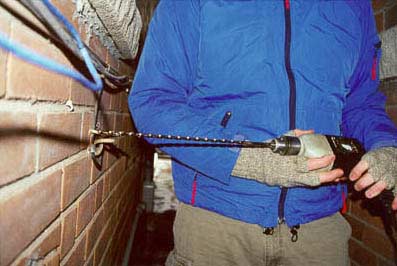
Our test house was renovated. We tried to use the air vents right off the bat but the old ones had been sealed and the new ones seemingly made 90 degree turns every six inches. In another test location we were fortunate enough to be able to use the heating ducts to drop cable between floors. In that situation it was simply a matter of running the Cat5 around the baseboards, and into the ducting. This was done by drilling a small hole under the vent cover, feeding the wire through and using a weight attached to the end to drop it down to the floor we wanted. At the right floor, the wire was simple fed out of the airducts through the grill to where it needed to go. It literally took ten minutes to do. Going back the renovated test house, we decided to drill some holes...


° Next Page 

Article Contents:
 Page 1:  — Installing a Home Ethernet
 Page 2:  Running wire on the outside
 Page 3:  Attaching the wire
 Page 4:  Tools and Conclusions

Resources
° Got Feedback?
° Mk.II Test Platform
° Heatsink Reviews
° Manufacturer Index
° Industry Dir.
° Cooling Projects
EverCool Thermal
Recently Tested

Thermaltake Contac 29 Heatsink Review

Zaward Vapor 120 Heatsink Review

Dynatron Genius G950 Heatsink Review

Gelid Tranquillo Heatsink Review

Zalman CNPS10X Performa Heatsink Review

Scythe Grand Kama Cross SCKC-2000 Heatsink Review
...More Articles >>

Tech Polls
Thermal Compound Testing
How much would you pay to read a comprehensive test report of various CPU Thermal Compound pastes?
Nothing
$2 - $4
$5 - $10
Number of votes: 1739

Websites you may also like:
Silent PC Review
Cooling-Masters
Matbe.com

Google Search Frostytech
Time stamped: 12:22PM, 07.30.2010


Member of The Rydium Network

Find a Heatsink / RSS Feeds
Latest Heatsink Reviews
Top 5 Heatsinks Tested
FrostyTech News RSS Feed
FrostyTech Reviews RSS Feed


FrostyTech.com Info
Feedback
Contact Us / Heatsink Submissions
Submit News
Legal


© Copyright 1999-2010 www.frostytech.com. All Rights Reserved. Privacy policy and Terms of Use
Images are © FrostyTech.com and may not be reproduced without express written permission.