TOP 5 Heat Sinks TOP 5 Low Profile Heat Sinks TOP 5 Liquid Coolers
Heatsinks by Brand / Mfgr Reviews + Articless Advanced Search
|
TOP 5 Heat Sinks TOP 5 Low Profile Heat Sinks TOP 5 Liquid Coolers Heatsinks by Brand / Mfgr Reviews + Articless Advanced Search |
Zalman ZM-MFC1 Fan Speed Controller Review
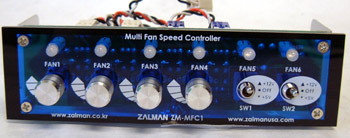
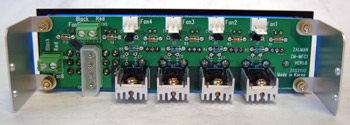
Up until now Zalman have been pretty much been a heatsink-only company. And while it's true that they have produced fans and powersupplies, they haven't worked on many accessories beyond that. Since Zalman's company goal is "computer noise prevention" it was only a matter of time before they joined the rank and file with their own multi fan speed controller bay. However, the Zalman ZMMFC1 offers some flexibility that other similar 5.25" bay fan speed controllers don't. Namely, the ZMMFC1 comes with four fan speed channels and a side of two extra channels that operate auxiliary devices at either 12V or 5V. We'll get to those in just a second, but getting back to the four fan speed controllers we find each one with a three-pin connector, dial control (rheostat) and blue LED indicator light.
Two types of extension cables are included with the unit; the first are 15" long and useful for fans whose RPM signals to the mainboard are not required. The second set of jumpers are the same length, but come wth a pigtale of about the same length that will delivers RPM signal to the mainboard. If you were using the ZMMFC1 with a processor fan you would need someway of letting the computer know what the RPM signal is. By using the second type of jumper cable Zalman include, we can still manually control fan speed, and also deliver the RPM signal to the mainboard to keep the computer happy.
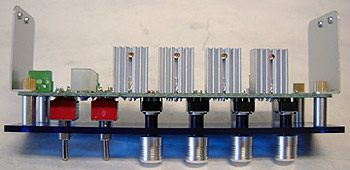
Fan speed is controlled with aluminum dials (rheostats) that have a nice grip to them. We looked at a similar device from Vantec, and while it did look really cool, the texturing of the aluminum dials made them somewhat slippery. The entire device draws power from just one molex power connector which plugs into the back of the unit. No molex power adaptors, or extension cables were included.
Now we already mentioned that there were four channels for fan speed control in addition to two other voltage-based channels. The two extra channels offer the option of connecting a pair of case fans, lights, or any other electrical device that runs on 12V to the unit through screw-down wire terminals. A set of toggle switches controls the voltage to these two terminals (12V, off, 5V) and LED's chance colour from blue (5V) to red (12V) to indicate the different voltage selected. Each of the channels will support a load of up to 7W which should take care of most fans you are likely to use.
|
 |
|
| |||||||||||||||||||||||
|
Find a Heatsink . Latest Heatsink Reviews . Top 5 Heatsinks Tested . Top 5 Low Profile Heatsinks . Top 5 Liquid Coolers . Heatsinks by Mfgr / Brand |
Social Media |
FrostyTech.com Info . Feedback . Contact Us / Heatsink Submissions . Submit News . Privacy Policy |
 | |
© Copyright 1999-2025 www.frostytech.com All Rights Reserved. Privacy policy and Terms of Use Images © FrostyTech.com and may not be reproduced without express written permission. Current students and faculty of accredited Universities may use Frostytech images in research papers and thesis, provided each image is attributed. | ||||

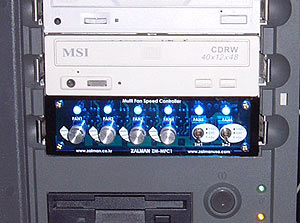 When a fan is connected to one of the four fan-speed channels the
LED will light up blue. If there is nothing connected to the channel the light
will remain off.
When a fan is connected to one of the four fan-speed channels the
LED will light up blue. If there is nothing connected to the channel the light
will remain off.